Watercolor Splash Photo Effect Templates: Instant Artistic Magic
There's a certain magic to watercolor art. The way colors bleed and blend, the texture of the paper, the beautiful, happy accidents that make each piece unique. For designers, marketers, and creators, capturing that organic, hand-painted feel can be a powerful way to connect with an audience. It feels personal, authentic, and deeply artistic. But traditionally, creating that effect from scratch is time-consuming and requires a specific skill set.
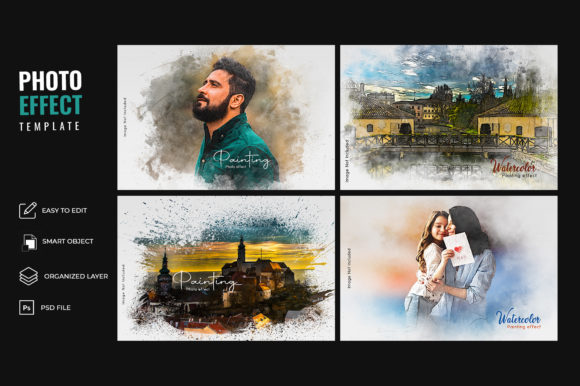
Imagine achieving that stunning, realistic watercolor aesthetic in just a few seconds. That's the promise and the reality of the Watercolor Splash Photo Effect Templates. This isn't just another filter. It's a sophisticated set of four PSD files that act as a creative partner, allowing you to transform your standard photographs and graphics into captivating watercolor paintings with minimal effort.
More Than a Filter: Understanding the Template's Anatomy
At its core, this design asset is built for simplicity and impact. The package includes four distinct PSD files, each offering a different watercolor splash composition and paper texture. The "paint splatters on a watercolor paper texture" aren't just a static overlay; they're crafted to create depth and realism. You simply place your image into a designated smart object layer, and the template does the heavy lifting, applying the color bleeds, paper grain, and paint splatter effects in a non-destructive way. This means you can tweak, adjust, and swap out images endlessly without ever damaging the original file.
The visual personality of this effect is immediately striking. It has a modern typography sensibility, even though it's an image effect. The style is organic yet controlled, balancing the wild, unpredictable nature of watercolor with a designer's touch. The overall appeal lies in its versatility. It can feel whimsical and romantic for a wedding invitation, gritty and artistic for a band poster, or clean and sophisticated for a high-end brand's social media graphic. It bridges the gap between digital precision and analog charm, making it a valuable piece of any creative's toolkit.
Where This Watercolor Effect Truly Shines
The applications for the Watercolor Splash Photo Effect Templates are vast, spanning nearly every field where visual impact matters. It’s a true workhorse for creative professionals and hobbyists alike.
- Branding & Logo Design: For businesses that want to convey artistry, craftsmanship, or a personal touch, this effect is invaluable. Imagine a florist's logo, a boutique coffee shop's menu header, or a handmade soap brand's packaging. Applying the watercolor effect to a brand mark or supporting imagery instantly builds a brand identity that feels warm and human.
- Marketing & Social Media Graphics: In a crowded digital space, a generic stock photo can get lost. Using these templates to create hero images for blog posts, eye-catching Instagram stories, or Facebook ad graphics can dramatically increase engagement. The effect is inherently tactile and stops the scroll, making it perfect for social media graphics that need to feel both professional and personal.
- Publishing & Editorial Design: Whether you're designing a book cover, a magazine spread, or a feature article header, the watercolor effect adds a layer of narrative and emotion. It works exceptionally well for genres like fiction, poetry, wellness, and lifestyle, where setting a specific mood is crucial. It can turn a simple author photo into a piece of art.
- Packaging & Product Presentation: For small business owners selling on platforms like Etsy, product presentation is everything. Using these templates to create mockups or product imagery for items like art prints, candles, or jewelry can elevate the perceived value. It makes the product feel like part of a larger, curated artistic vision.
- Personal Projects & Crafting: The joy isn't limited to commercial work. Hobbyists can use it to create unique family portraits, custom greeting cards, or personalized wall art. It’s a fantastic tool for anyone exploring digital scrapbooking or creating custom invitations for special events.
Practical Guidance for Flawless Integration
While the template is simple to use, a thoughtful approach will yield the best results. Here’s how to integrate it seamlessly into your workflow.
First, evaluate your project fit. This effect communicates a specific message. It’s artistic, organic, and textured. It’s an excellent choice for a yoga studio's website but might clash with the clean, minimalist aesthetic of a fintech startup. Consider if the watercolor style aligns with the core personality of the project you're working on.
Next, think about font pairing. The texture of the watercolor effect is a dominant visual element, so your choice of typeface is critical. To create balance, pair it with clean, simple fonts. A sans serif font like Montserrat or Lato can provide a modern, readable counterpoint. For a more elegant or traditional feel, a classic serif font like Garamond or a subtle script font can work beautifully, but be mindful of readability, especially at smaller sizes. Avoid pairing it with another highly decorative or handwritten font, as this can create visual chaos.
Always test with your actual content. The look of the effect can change dramatically depending on the source image. High-contrast photos with clear subjects often work best. A portrait with a simple background will yield a different, often cleaner, result than a busy landscape. The four included PSD files give you options—experiment to see which splash composition best frames your subject.
Finally, understand the commercial licensing. For designers, marketers, and business owners, this is a non-negotiable step. Ensure the license of any premium font or design asset you purchase covers your intended use, whether for a client project, a print-on-demand product, or a digital download. This protects you and your clients legally and is a hallmark of professional practice.
The Watercolor Splash Photo Effect Templates